
Draft Management Workflow From Idea to Publish: A Founder-Friendly System That Prevents Stalled Drafts
A draft management workflow from idea to publish gives every content idea a visible path: why it matters, what happens next, who needs to decide, and when the piece will be reviewed.
That matters most when you are a founder. You may be the strategist, subject-matter expert, writer, editor, and final approver at the same time. Without a simple system, ideas collect in notes, drafts sit half-finished, and publishing becomes a last-minute task that competes with customer work, sales, and product delivery.
You do not need a large editorial team or a complicated content stack to solve this. You need a small number of stages, clear definitions of done, a limited active queue, and a review rhythm you can protect.
This guide lays out a practical workflow:
> Idea → Brief → Draft → Review → Publish → Repurpose
Use it in a spreadsheet, task board, shared document, or planning tool. The tool is secondary. A practical operating rule I recommend: give each draft one source of truth, one next action, and a next review date.
The real problem: decision overload and invisible work-in-progress
Most stalled drafts do not fail because someone cannot write. They fail because the decisions around writing remain unresolved.
A note says “write about onboarding.” But for whom? What question will it answer? What can you credibly say? Is the goal to explain a process, handle an objection, or support a sales conversation? If those choices are not made before drafting begins, the writer has to make them repeatedly while trying to write.
That is how a seemingly simple post becomes a long, uncertain project.
In many founder workflows, work-in-progress can become invisible: loose voice notes, bookmarked articles, partial outlines, documents with comments, and CMS drafts that are not actively being reviewed. They may all feel like content assets, but they are not a reliable publishing pipeline.
A calendar mainly helps you decide when something goes out; by itself, it often does not show whether a topic belongs, whether a draft is reviewable, or what is blocking it. It does not tell you whether the topic belongs in your strategy, whether the draft is reviewable, or what is blocking it. A founder-friendly system needs a clear path from business context to topics, drafts, review, and a publishing rhythm you can actually maintain. A calendar or rapid draft generator alone is not enough. See what to look for in a founder content planning platform for broader planning criteria.
Planning, scheduling, and publishing are different decisions
A reliable workflow separates three jobs that are often blended together.
Planning decides what belongs
Planning answers:
- Who are we trying to help?
- What question, problem, or decision does this content address?
- Why is this topic relevant to our offer and audience?
- What evidence, examples, or experience can support it?
- What is outside the scope of this piece?
These are direction decisions. Make them before the draft grows. If you skip them, you may produce a lot of possible content without building a useful body of published work.
A written direction layer helps here. It gives you boundaries for audience, themes, claims, and positioning, so every new idea does not require a strategic debate. If your topics regularly wander, start with a content direction framework for founder-led marketing before adding more items to the queue.
Scheduling decides when a ready piece goes out
Scheduling is a delivery choice, not a strategy choice. It should happen after a piece is sufficiently reviewed, not as a hopeful placeholder for something that may never be finished.
A scheduled date can create useful urgency, but it cannot rescue an unclear brief or an unfinished review. If you schedule work too early, publish day becomes a scramble for missing examples, approvals, links, and formatting.
Publishing decides what represents your business publicly
Publishing is the final approval boundary. It is where you decide whether the page is accurate, helpful, on-voice, and appropriate to put your name behind.
That boundary should stay explicit even when you use writing assistance or automation. A prepared draft is not the same thing as an approved page. The founder, or a clearly designated reviewer, should make the final decision about claims, examples, positioning, and the call to action.
The workflow at a glance
The six stages below are intentionally simple. They create enough structure to prevent limbo without making every post feel like a formal production project.
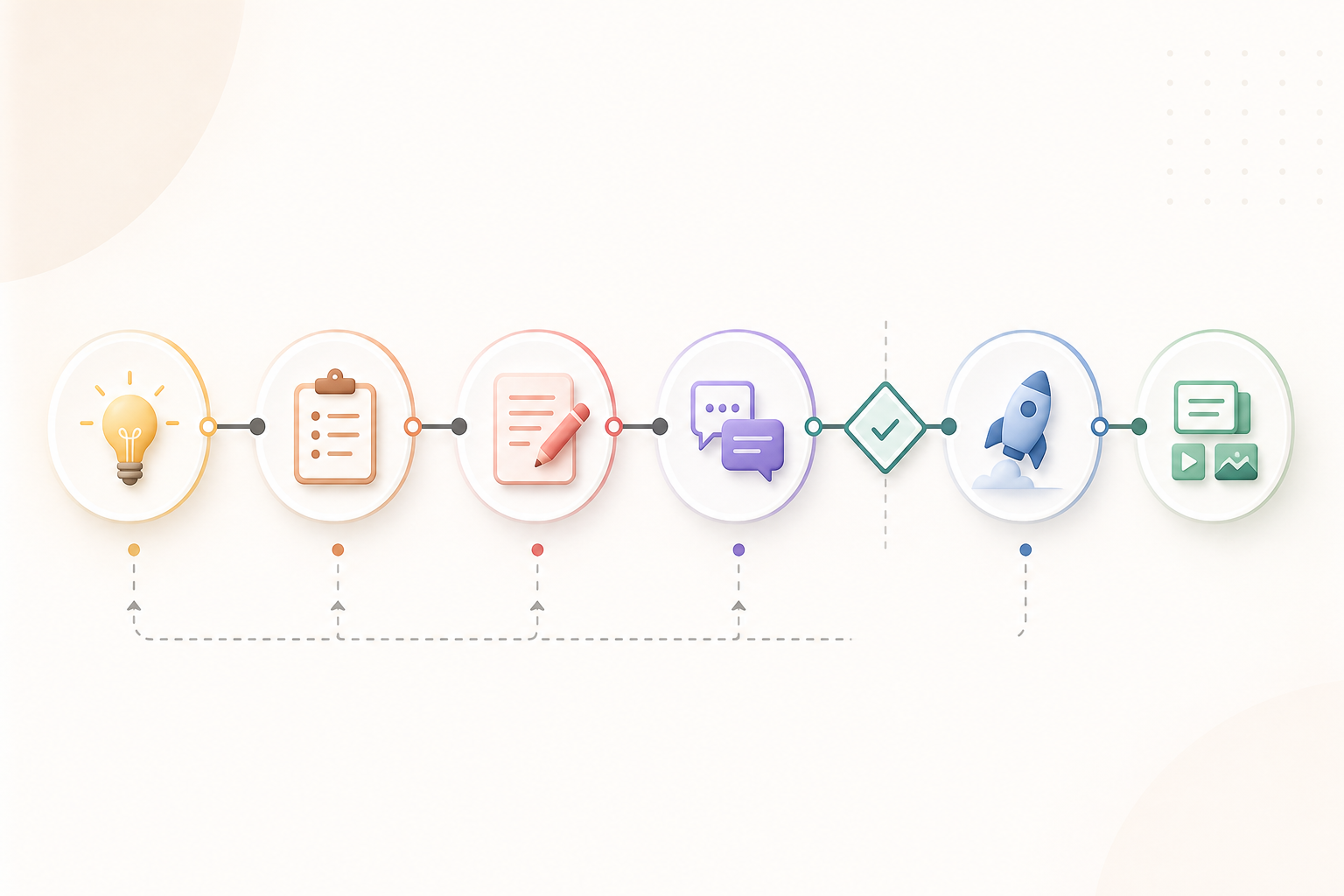
| Stage | The central question | Move forward when… |
|---|---|---|
| Idea | Is this worth exploring? | It names a reader, a question or decision, and a reason it matters. |
| Brief | What exactly are we making? | The reader, promise, angle, proof, boundary, and CTA are clear. |
| Draft | Can this be reviewed? | The structure is complete and unsupported claims are flagged, qualified, or removed. |
| Review | Is this trustworthy and on-brand? | The reviewer approves, requests specific changes, or intentionally parks it. |
| Publish | Is it ready to become public? | Formatting, title, links, metadata, and final checks are complete. |
| Repurpose | What can this teach or support next? | One useful follow-up asset or learning note has been captured. |
This structure follows the lightweight editorial process described in implementation steps for a consistent publishing schedule: Idea, Brief, Draft, Review, Publish, and Repurpose. The stages matter because each one has a different job. Do not expect a rough idea to behave like a publish-ready article.
The 6-stage draft management workflow from idea to publish
Stage 1: Idea — capture an input you can use later
Purpose: Capture a real content opportunity before it disappears, without pretending every thought deserves a place on the calendar.
An idea is not merely a broad subject like “AI,” “leadership,” or “productivity.” A useful idea connects a specific reader to a problem, question, tension, or decision.
Good sources include repeated sales questions, support requests, onboarding confusion, objections in proposals, explanations you keep sending by email, product trade-offs, and founder lessons you can share truthfully. Audience responses can become a dependable input when you treat them as an operating loop rather than random inspiration.
Related reading (optional): Audience engagement loop for consistent content ideas.
Definition of done for Idea:
- One primary reader is named.
- One question or decision is identified.
- There is a short “why now” note.
- You can name a possible proof hook, such as a public source, truthful example, product detail, or scenario.
Example:
> For service-business owners: how to choose a cancellation window that protects staff time without making the policy unnecessarily rigid. Use a truthful example of the factors to weigh; do not promise that one policy eliminates no-shows.
Common failure mode: collecting dozens of vague prompts that require fresh strategy work later.
Better next action: “Turn this into a brief on Tuesday” is better than “write article.” It is specific, small, and appropriate to the stage.
Stage 2: Brief — lock direction before execution
Purpose: Decide what the piece is for before investing time in prose.
The brief is the anti-rework stage. It separates direction from execution. Once you agree on the reader, promise, angle, evidence, and boundary, you no longer have to reconsider those decisions in every paragraph.
A brief does not need to be long. A few well-chosen fields are enough for many founder-led articles.
Definition of done for Brief:
- Reader: one primary person in a real situation.
- Question: the one problem or decision the article will address.
- Promise: what the reader should understand or be able to do after reading.
- Angle: the useful point of view or constraint that makes this more than a generic summary.
- Proof: what will support material claims: sources, approved product facts, examples, or clearly labeled scenarios.
- Boundary: what this article will not try to cover.
- CTA: the appropriate next step for a reader who wants help.
Example brief:
- Reader: solo founder selling a B2B service.
- Question: how do I keep a publishing habit during uneven work weeks?
- Promise: choose a realistic weekly minimum and design a fallback format.
- Angle: consistency is a workflow design problem, not a motivation problem.
- Proof: a sample weekly rhythm, a definition-of-done checklist, and illustrative examples.
- Boundary: no claims about algorithm performance or channel-specific growth tactics.
- CTA: invite the reader to create a simple content plan or assess their current workflow.
Common failure mode: skipping the boundary. Without one, a focused article turns into a “complete guide to everything,” which increases review burden and makes publishing less likely.
Stage 3: Draft — write something that can be reviewed
Purpose: Turn the brief into a complete, reviewable asset. Drafting is not the same as polishing.
A draft should make the argument, answer the question, and show the reader what to do. It does not need to contain perfect phrasing before anyone else sees it. Trying to draft and perfect every sentence at once is one of the fastest routes to stalled work.
Definition of done for Draft:
- The opening answers the reader’s main question early.
- Headings follow the brief rather than introducing a new scope.
- The core explanation is complete enough to assess.
- At least one concrete example, checklist, script, or scenario appears where it helps.
- Material claims are supported, qualified, flagged for verification, or removed.
- The intended CTA is included.
- The draft has a clear link to its canonical location.
A practical rule: a draft can move to review when a reviewer can make a publish decision without having to reconstruct the author’s intent.
Common failure mode: leaving placeholders such as “add research,” “find an example,” or “check this claim” throughout the piece, then calling it ready for review.
If a missing fact is essential, keep the item in Draft and make the next action precise: “Verify the policy wording” or “Replace this generic example with an approved scenario.”
Stage 4: Review — protect trust without creating an endless edit loop
Purpose: Confirm that the draft is accurate, useful, representative of the business, and ready to publish.
For founder-led content, review is not bureaucracy. It is the point where the person accountable for the business checks the details only they can judge well: strategic angle, product truth, sensitive claims, actual limitations, tone, and positioning.
Definition of done for Review: the reviewer chooses one of three explicit outcomes:
- Approved to publish: only production work remains.
- Revise with specific notes: one owner and a new review date are assigned.
- Park or archive: the draft is intentionally removed from active work, with a reason recorded.
Avoid feedback like “make this stronger” or “needs work.” Those comments create guessing. Instead, say what decision is unresolved: “Narrow this to agencies with fewer than 10 people,” “remove the unverified claim,” or “add a real explanation of how our process differs.”
A useful founder review checklist asks:
- Does this answer one real reader question?
- Is the central promise clear near the start?
- Are factual claims supported, qualified, or removed?
- Are examples truthful and appropriate to share?
- Does the tone match the business?
- Does the CTA fit the reader and the article’s purpose?
- Is there anything that implies first-hand experience, a customer result, or a guarantee that we cannot substantiate?
This review discipline is especially important for public content because founders need to check tone, claims, examples, and calls to action before publishing.
Stage 5: Publish — complete the production work
Purpose: Turn an approved draft into a usable public page.
Publishing should be a defined production stage, not another opportunity to reopen strategy. Once the article is approved, the work is usually practical: formatting, adding links, checking the title, setting metadata where relevant, and completing a final proofread.
Definition of done for Publish:
- Heading levels, lists, spacing, and images are readable and consistent.
- The title matches the article’s actual promise.
- Links point to the intended destinations.
- Any SEO title and description you use are accurate and specific.
- The article has been checked for obvious errors, broken sentences, placeholders, and accidental internal notes.
- The piece is published or deliberately scheduled.
Quick final checks:
- Read the first paragraph and first heading aloud. Tighten them if they delay the answer.
- Search for absolute language: “guarantees,” “always,” “never,” and “best.” Support it, qualify it, or remove it.
- Confirm that the CTA does not overreach. A reader seeking a process guide may be better served by related reading than a hard sales demand.
Common failure mode: turning publish day into a request for major new sections, a complete visual redesign, or another round of positioning. If those changes are necessary, move the piece back to Review explicitly rather than hiding the work in Publish.
Stage 6: Repurpose and learn — close the loop
Purpose: Make one useful piece of work inform the next.
Repurposing does not mean copying the same article everywhere. It means extracting one useful angle for a secondary channel or a relevant conversation. A blog guide might become a short founder post, an email answer to a common objection, or a checklist shared with a prospect who asked the same question.
Definition of done for Repurpose:
- One smaller follow-up asset is created or a conscious decision is made not to repurpose this article.
- A short learning note is added: what question it answered, what response it received, or what follow-up question it created.
- Any new topic opportunity goes back to the Idea stage rather than becoming an untracked note.
Keep this modest. One solid secondary use is enough. Trying to turn every article into content for every channel often creates more work than value.
Set up a draft pipeline that stays visible
A draft management workflow for solo founders works best when you can see the pipeline at a glance. You should be able to answer four questions quickly:
- What is actively being worked on?
- What is waiting for my decision?
- What is blocked, and why?
- What can realistically publish next?
Use any tool that you will reliably open. A spreadsheet, task app, shared document, or planning platform can work. The workflow should be lighter than the work it manages.
Use a minimal board
A compact board can translate the six editorial stages into five operational columns:
> Ideas → This Week → Drafting → Review → Scheduled/Published
- Ideas: captured inputs, not promises.
- This Week: the small set you intend to move now.
- Drafting: active writing and assembly work.
- Review: work that is genuinely ready for a founder or reviewer decision.
- Scheduled/Published: approved work with a release slot or completed work.
This kind of simple workflow board keeps blockers visible without requiring a complex process. It aligns with the founder system described in how to keep consistent content with limited time.
Add only the fields that prevent chaos
Each item should carry enough information to move without a separate detective project.
| Field | Why it matters | Good example |
|---|---|---|
| Owner | Creates one accountable next mover. | “Alex” rather than “Marketing.” |
| Next action | Makes progress concrete. | “Add the cancellation-policy scenario.” |
| Review date | Prevents a waiting room. | “Thursday, 2 pm.” |
| Publish window | Connects approved work to cadence. | “Week of 18 November.” |
| Canonical draft link | Prevents version confusion. | Link to the one current document or CMS draft. |
| Reader and keyword/topic | Keeps the draft focused. | “Solo B2B founder / content workflow.” |
| CTA | Prevents a last-minute conversion debate. | “Read the planning framework.” |
| Evidence notes | Shows what needs checking. | “Product page, founder-approved example.” |
| Founder decision needed | Protects scarce review time. | “Yes: approve pricing language.” |
The required fields are not busywork. They reduce repeat decisions and make it much harder for a draft to disappear into a folder with no owner, review date, or release plan.
Choose one canonical draft location
The “real” draft must live in one place. Otherwise, feedback appears in one document, edits happen in another, and the CMS contains a third version that may or may not be current.
Choose one model:
- A shared document is canonical.
- The CMS draft is canonical.
- A markdown file or note is canonical.
Then put that link on the board. If an item has no canonical draft link, it is not ready to enter Drafting.
Use comments for discussion if helpful, but keep substantive edits in the canonical location. This small rule eliminates the recurring question: “Which version are we publishing?”
Use a lightweight work-in-progress limit
Do not allow more items in Review than you can realistically approve in the next review session. This is your WIP limit.
For a solo founder, that may be one or two items. That is not a sign of low ambition. It is a way to prevent a pile of supposedly finished drafts from turning review into an exhausting backlog.
If Review is full, do not start more drafts merely to feel productive. Improve what is already moving, reduce scope, or collect ideas for later.
How to prevent drafts from stalling
Drafts stall when the next move is vague, review time is absent, or the definition of “good enough” keeps changing. The solution is not more guilt. It is a workflow that makes uncertainty visible early.
The next action plus review date rule
Adopt one non-negotiable rule:
> Every active draft must have a next action and a review date.
The next action should start with a verb and be small enough to complete in a focused session. “Finish article” is too broad. “Write the opening and add two headings from the approved outline” is actionable.
The review date is not a promise that the piece will be finished by then. It is a scheduled moment to make a decision: continue, narrow the scope, request a specific input, park the work, or approve it.
Good record:
- Status: Drafting
- Owner: Founder
- Next action: Add the worked example and check the two product claims.
- Review date: Friday
Bad record:
- Status: In progress
- Owner: Marketing
- Next action: Finish
- Review date: blank
The first item can move. The second item is only a hope.
Reserve founder review capacity
When only the founder can approve content, review is a scarce operating resource. Treat it like a customer meeting or a finance review: place it on the calendar before the week fills up.
A review block does not need to be long. The important thing is that it happens consistently and ends with decisions. For each item, approve, request specific revision, or park it.
A pull-based approach helps: the founder pulls a limited number of review-ready drafts rather than allowing unlimited work to be pushed into Review. This is how you avoid the cycle where five drafts accumulate, reviewing feels overwhelming, and nothing gets approved.
Use a definition of done to stop perfection loops
A Definition of Done is a quality boundary, not a demand for sameness. It tells you what must be true before an article is ready to publish so that every piece does not receive endless polishing.
For most founder-led articles, a practical Definition of Done includes:
- One clear reader and useful outcome.
- The main question answered early.
- A structure that follows the brief.
- A concrete example, scenario, script, or checklist where useful.
- Claims that are supported, qualified, or removed.
- An honest CTA appropriate to the article.
- A readable final pass for formatting, spelling, and links.
This keeps the quality bar meaningful while limiting the urge to make every post definitive. The same principle is outlined in implementation steps for a consistent publishing schedule.
Batch carefully: outlines are safer than rough-draft stockpiles
Batching can be useful, but it creates a trap when it produces a folder full of rough drafts without review dates, owners, or scheduled release slots.
A rough draft is not a buffer. It becomes a buffer only when it is close enough to review and has a known path to publishing.
For many founders, a hybrid approach works well:
- Batch idea capture and briefing in one focused session.
- Draft one or two pieces at a time.
- Keep Review deliberately small.
- Publish on a steady cadence you can sustain.
The distinction matters. Publishing strategy for founders: batch vs. drip offers further guidance on choosing a cadence that fits actual capacity.
Run a 14-day stuck-draft rescue protocol
A draft that has sat for 14 days is not a moral failure. It is a signal. The scope may be wrong, the evidence may be missing, or the review path may be unclear.
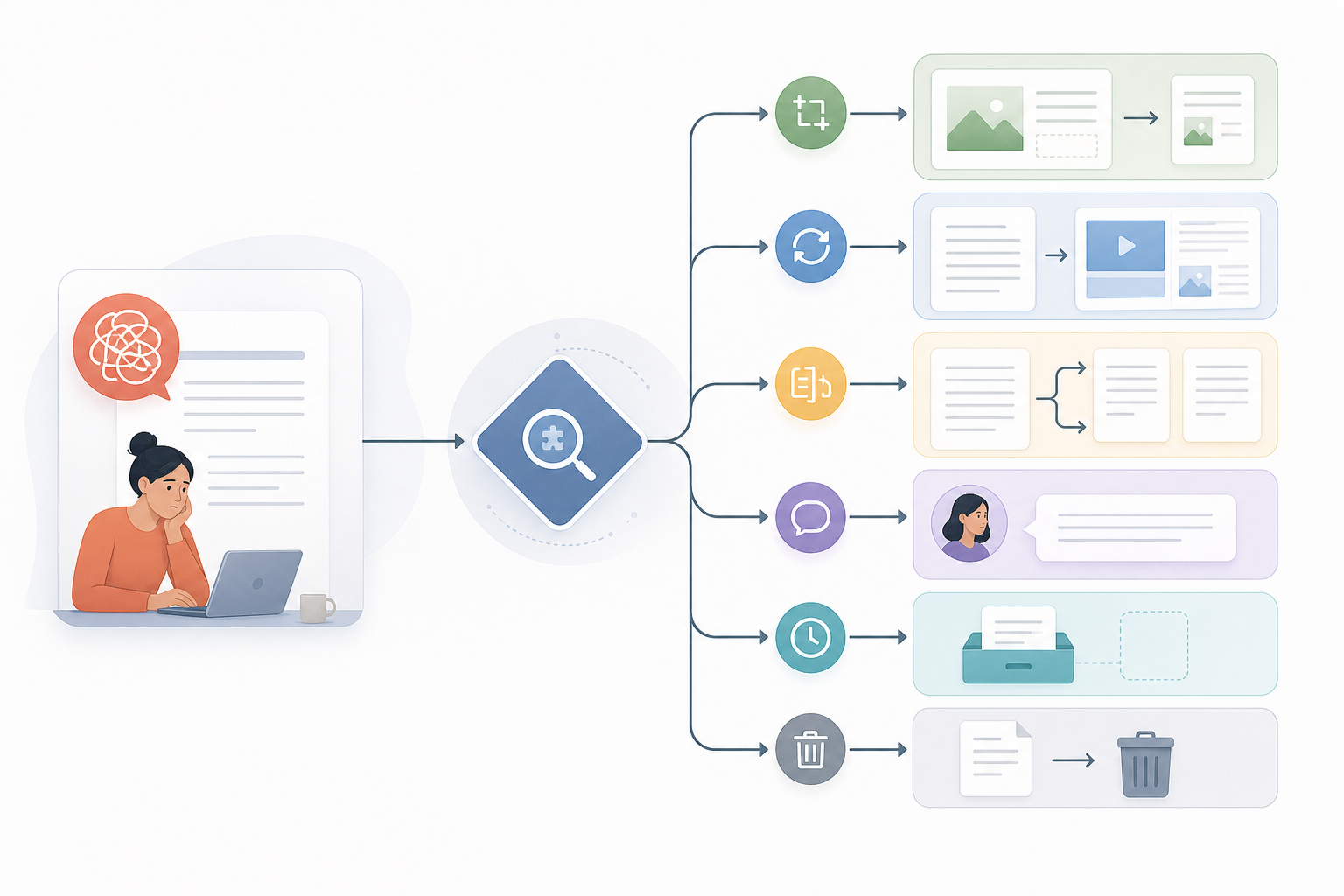
Do not leave it in limbo. Run this rescue protocol.
Step 1: State the blocker in one sentence.
Examples:
- “This needs founder approval of a sensitive claim.”
- “The topic is too broad for one article.”
- “We do not have an example we can share.”
- “The intended reader is unclear.”
Step 2: Choose one outcome.
- Cut scope. Keep the topic but answer one narrower question well.
- Convert it to a shorter format. Use the strongest insight as a brief post, email, or FAQ answer.
- Split it. Create two properly briefed drafts when two readers or decisions are mixed together.
- Request a decision. If it is blocked on founder input, write the exact question that needs an answer and schedule it.
- Park it with a reason. Record why it no longer belongs in the active queue.
- Archive it. Delete or archive work that has no strategic fit rather than carrying it as silent obligation.
Step 3: Set a new next action and review date.
A rescue is incomplete until the board reflects the decision. “Revisit later” is not a workflow status.
A solo founder’s weekly operating rhythm
The right cadence is the one that survives busy weeks. You do not need to publish every day. You need a rhythm you can repeat while running the business.
If you have 90 minutes a week
Aim to publish one small, useful answer.
- 10 minutes: choose a real buyer question.
- 15 minutes: complete a short brief.
- 45 minutes: draft a direct answer with one truthful example or scenario.
- 20 minutes: review, format, and publish or schedule.
Keep the format constrained: a short answer, checklist, or objection-handling post can be valuable when it genuinely helps the reader make a decision.
If the week gets disrupted, do not create a catch-up backlog. Reduce the next piece’s scope and restart the rhythm.
If you have three hours a week
Aim for one core piece and one simple repurposed asset.
- 30 minutes: brief and outline.
- 90 minutes: draft the core article or newsletter.
- 30 minutes: founder review and revisions.
- 30 minutes: extract one post, email, or useful sales follow-up.
For example, an article about implementation expectations could produce a shorter post that lists what a prospective customer should clarify before kickoff. The secondary piece should preserve the original message, not force a new campaign.
If you have five hours a week
Use the extra time for stronger evidence, examples, and distribution—not endless editing.
- 45 minutes: brief, outline, and evidence notes.
- 2 hours: draft the guide.
- 45 minutes: review and tighten.
- 60 minutes: prepare one or two appropriate distribution actions.
- 30 minutes: capture learnings and brief the next item.
A distribution action might be sharing the guide in a relevant conversation, sending it to a prospect who asked the question it addresses, or publishing one excerpt on your primary channel. Keep it proportional to the value of the piece.
For more help choosing a cadence that works alongside a full founder schedule, read how to keep consistent content with limited time.
Templates that reduce weekly decisions
Templates are useful because they reduce decision load. They should guide thinking, not force every article into the same voice.
One-page brief template
- Working title:
- Primary reader:
- Question this piece answers:
- Why it matters now:
- Promise to the reader:
- Angle or point of view:
- Key points:
- Evidence or examples available:
- What we will not claim or cover:
- CTA:
- Owner, next action, and review date:
Fast draft skeleton
- Answer up top: give the reader the conclusion in two to four sentences.
- Context: explain who this applies to and when.
- Main explanation: use three or four sections that follow the brief.
- Concrete example: show how the idea might look in practice without presenting an invented outcome as fact.
- Common mistake or trade-off: help the reader avoid a predictable problem.
- Next step: offer a relevant action or related resource.
Founder review template
- Is the purpose clear in the opening?
- Is the article focused on one reader and one outcome?
- Are the claims accurate, qualified, or removed?
- Is there original value beyond generic advice?
- Are examples honest and safe to share?
- Does the CTA fit the content?
- Can this be approved, revised with specific notes, or parked today?
Using AI responsibly in the workflow
AI can be helpful inside a draft workflow, especially when it reduces blank-page time. It can organize notes, cluster questions, propose an outline, identify unclear sections, and prepare an initial draft.
But it should support the workflow, not bypass it.
Where AI can help
Use it for tasks you can verify:
- Organizing notes from calls, emails, or internal documents.
- Grouping related customer questions into themes.
- Turning a founder-approved brief into an outline.
- Suggesting headings or alternate explanations.
- Flagging generic phrasing, repetition, or gaps in a draft.
- Producing a first pass that clearly marks claims requiring verification.
Where AI should stop
AI should not make the final decision about what represents your business. It does not know your current product details, customer relationships, legal or commercial constraints, or whether a claim is supported unless you have supplied reliable evidence.
Set the operating boundary at ready for review. The draft can be prepared, but a founder or designated reviewer must check accuracy, add real context, and explicitly approve publication.
A useful review method is to sort statements into three buckets:
- Supported: you have evidence you can stand behind.
- Qualified: the point may be useful, but it needs careful language and stated limits.
- Removed: you cannot verify it, it overstates the case, or it adds little value.
Be especially careful with numbers, performance claims, customer stories, quotations, and first-hand language such as “we have seen” or “our clients always.” If you cannot substantiate it, remove it or rewrite it as a clearly illustrative scenario.
Stage-based prompts
Prompts work better when they match the stage of work.
Idea prompt:
> Group these customer questions into themes. For each theme, propose one content idea, identify the reader and decision it supports, and exclude subjects outside these boundaries: [insert boundaries].
Brief prompt:
> Create a brief for this working title. Include the reader, one question answered, a specific angle, key points, proof needed, boundaries, and questions I must answer before drafting. Do not invent statistics, testimonials, or product capabilities.
Draft prompt:
> Draft this article from the brief using plain language and short sections. Flag any factual claim that needs evidence with [VERIFY]. Do not add numbers, named endorsements, or first-hand experiences that were not supplied.
Review prompt:
> Identify unclear claims, generic sections, missing examples, implied first-hand statements, and the smallest set of edits needed to reach ready-for-review quality.
These are recommendations for managing the workflow, not a substitute for actual editorial judgment.
When a planning system is worth considering
A manual board is enough for many founders. You may want a more structured planning system when your ideas, briefs, drafts, reviews, and publishing calendar are repeatedly splitting across tools—or when you are spending too much time reconstructing what should happen next.
Look for a system that helps you retain business context, choose topics deliberately, manage drafts through review, and sustain a realistic publishing rhythm. Be cautious of any approach that treats fast generation as the entire workflow. The useful question is not “Can it create a draft?” but “Can it help us make, review, and publish good decisions consistently?”
Content Redefined AI is designed around structured content planning for founders. If you are evaluating planning support, start with the criteria in what to look for in a founder content planning platform, then decide whether the workflow fits your business and approval process.
FAQ: Draft management workflow from idea to publish
What stages should every draft pass through?
Use a small, visible sequence: Idea → Brief → Draft → Review → Publish → Repurpose. The important part is not the labels themselves. It is defining what must be true before an item can move forward.
For example, a Brief should name the reader, promise, angle, proof, boundary, and CTA. A Draft should be complete enough for a reviewer to make a decision. Review should end with approval, specific revision notes, or an intentional decision to park the piece.
What is the simplest draft management workflow for solo founders?
Use one board with five operational statuses: Ideas → This Week → Drafting → Review → Scheduled/Published. For every active item, record an owner, next action, review date, and canonical draft link.
Keep the active queue small. If you can only review one piece per week, do not allow five pieces into Review.
How do I avoid a draft graveyard when batching content?
Do not count rough drafts as a content buffer. A draft becomes a usable buffer only when it has a clear next step, an owner, a review date, and a likely release window.
Batching ideas and outlines is often safer than batching many incomplete drafts. If you batch drafts, reserve review capacity at the same time.
What should be true before a draft moves from Brief to Draft to Review?
Before leaving Brief, the direction should be stable: reader, promise, angle, proof, boundary, and CTA are known.
Before leaving Draft, the piece should have a complete structure, useful explanation, and any questionable claims should be verified, qualified, or removed.
Before leaving Review, the founder or reviewer should make a clear publish, revise, or park decision. “Looks mostly done” is not an outcome.
Where does AI help in a draft workflow, and where should it stop?
AI can help organize research, suggest structure, and prepare a first draft. It should stop at ready for review. A human reviewer should verify factual claims, add business-specific knowledge, assess tone and usefulness, and approve publication.
A fluent draft is not evidence. Treat AI output as material to review, not authority to publish.
What should I do if I miss a publishing week?
Do not try to compensate by doubling the workload. Return to the smallest useful format that fits the week: a direct answer, checklist, or short objection-handling post. Then resume your normal rhythm.
A publishing schedule is useful only if it survives normal business volatility. The goal is a cadence you can maintain, not an ideal plan that collapses after one busy week.
Start with the next visible move
You do not need to redesign your whole content operation today. Start with one board, one canonical draft location, and one rule: every active draft has a next action and review date.
Then run your next piece through the six stages. Capture a specific idea, write a small brief, draft for review rather than perfection, protect a review slot, publish when the definition of done is met, and record what the piece should inform next.
That is how a draft management workflow from idea to publish becomes a dependable founder habit rather than a collection of unfinished documents.